
By Kyle Brodeur, Director of Tech, U of Digital
Most people meet an AI assistant the same way every time. Open a blank chat, explain who you are, explain the tools you use, paste in the document you are working from, describe the process, and only then ask the question.
If you are an LMS admin, you already know this. But the same problem hits platform admins, support leads, ops managers. Anyone who carries process knowledge for a team. Even with AI tools available, without a system around them, you are still the one re-explaining the context every session.
At U of Digital, that context gets complicated fast. Our job is to take what is changing across digital marketing and advertising, make sense of it, and turn it into training people can actually use.
U of Digital is built on Intellum. The examples in this series come from managing that platform, but the patterns apply to any system where process knowledge lives in someone’s head.
The same piece of knowledge might matter to several clients, only one client, or only when combined with something else. So our internal knowledge base is not just a folder of documents. It is a working map of the industry, our clients, and how the pieces relate.
That sets a higher bar than building a generic company chatbot.
And, the next day you do all of it again. The assistant is capable, but it has amnesia, and you are the one paying for it in re-explanation.
We got tired of that at U of Digital. So we stopped treating Claude like a chat window and started treating it like a coworker who has been here a while. Here’s how the assistant that did that work is actually built.
This is the second post in our AI operations series.
- In the last post, I Was the LMS Bottleneck., I showed what happened when we pointed Claude at our SOP mess and how we built the system the team could live in.
- We Taught Claude How U of Digital Teaches. Now It Helps Us Scale. ← You are here.
- Coming next: how the assistant caught its own mistakes during a real badge delivery workflow.
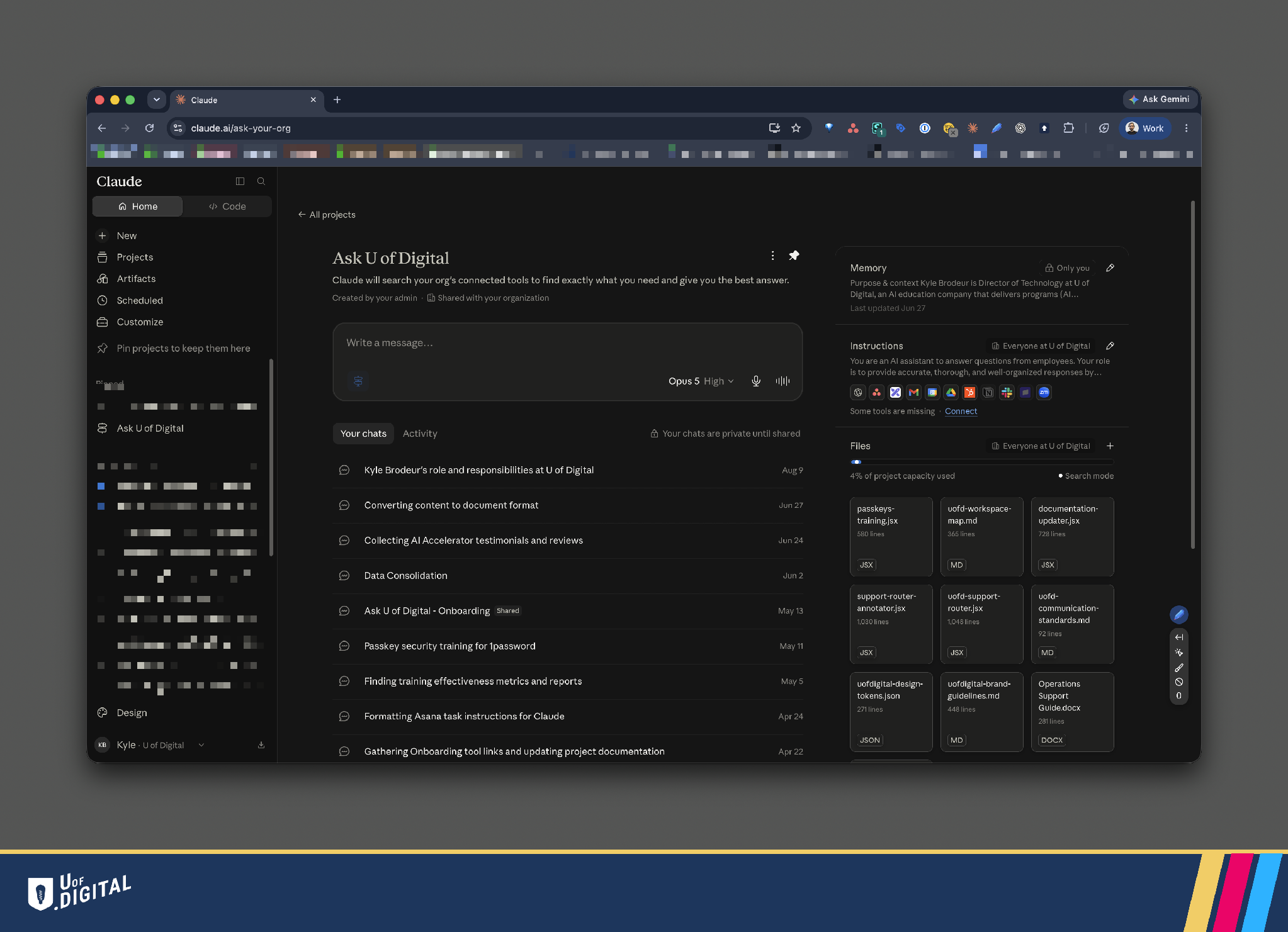
Claude feature: Ask Your Org
Claude has a feature you can enable to create a global project for your organization called “Ask Your Org.”
It’s a persistent, configurable workspace that already knows our processes, our brand, our tools, and the people who own each piece of the operation.
Every conversation starts with all of that context already loaded. Nobody re-explains what a High-Value Client is or who handles badge issuance, because the assistant already knows.
The difference between a chat and a project, and a team workspace
A normal chat starts blank every time. It has web search and not much else. It forgets you the moment you close the tab.

Even if you are savvy enough to set up a project, you are still building it yourself. Empty instructions, no memory yet, no files, no connected tools. Every team member would need to do the same work from scratch.

The Ask Your Org workspace is the opposite on every axis.
It carries instructions, reference files, and memory into every new conversation. It connects to the actual systems where our work lives, so it can search and act instead of guess. It learns stable facts about the team and applies them next time. And it renders everything in our brand without being asked, because the brand rules are already in the room.
None of that is exotic. It is the same Claude. The difference is entirely in what you put around it.
We did not simply need Claude to know more.
We needed it to know which source to use, which context applies, and when separate pieces of knowledge belong together. That changed how we built the system around it.
Five layers, and what each one is for
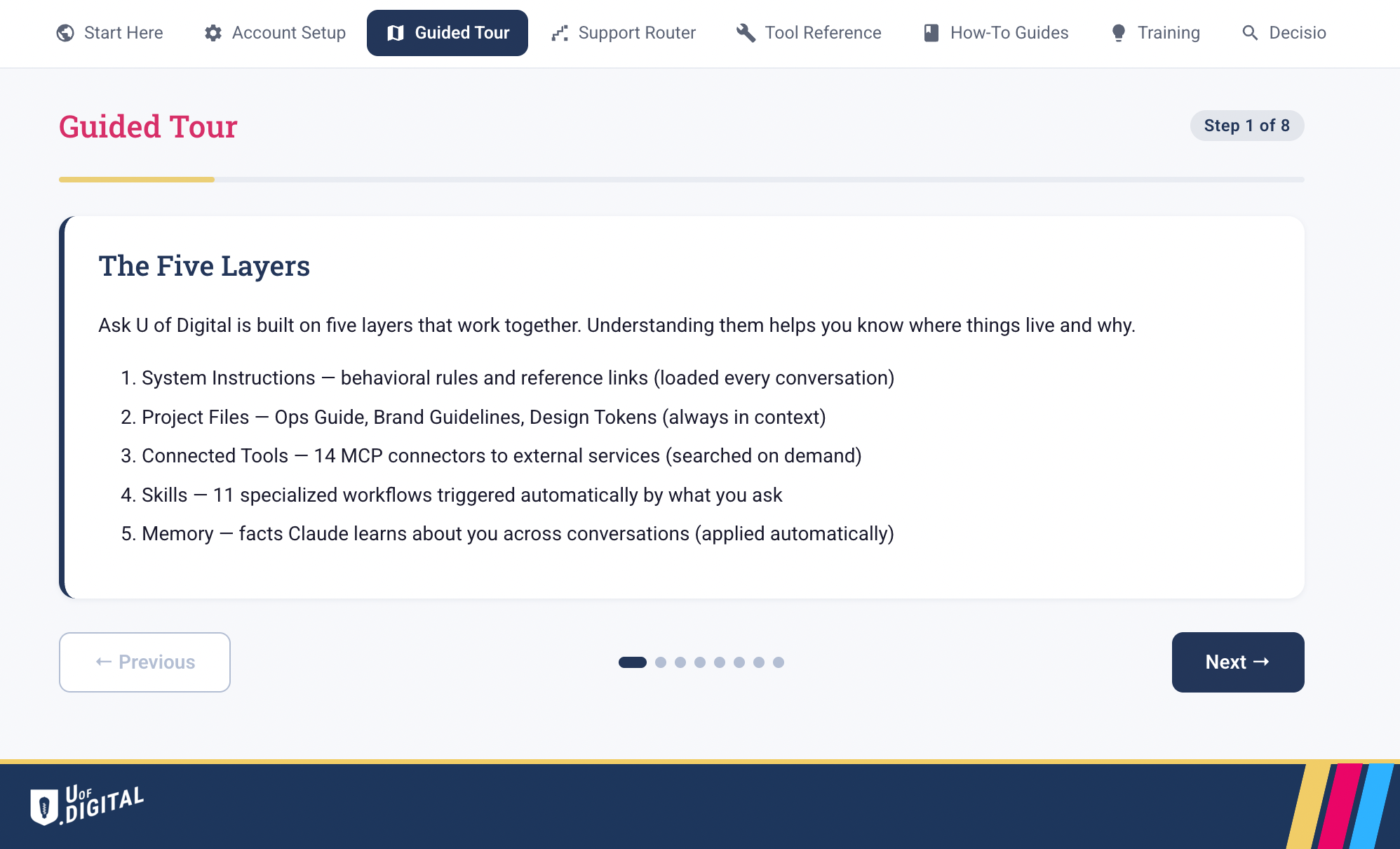
We think about the assistant as five layers, because that framing tells you where a new piece of knowledge belongs.
What’s in each layer?
Layer 1: System instructions. The assistant’s persona, its rule to search our own systems before answering, its citation format, and a short list of links to the places that matter. This is behavior. It loads into every conversation automatically.
Layer 2: Project files. We attach exactly three: the Operations Support Guide, the brand guidelines, and the design tokens. These are the documents every conversation might need, so they are always present rather than searched for.
Layer 3: Connected tools. This is where the assistant stops being a talker and becomes a doer. It reaches into the actual systems where our work lives, so it can pull the current state rather than a stale snapshot.
Ours connects to 10 tools:
- Asana: task management, SOP lifecycle, project tracking
- Intellum: our LMS platform (courses, credentials, learner data)
- Beehiiv: newsletter and email campaigns
- HubSpot: CRM, contacts, deal pipeline
- Google Workspace: Drive, Gmail, Calendar, Sheets
- Slack: team communication, decision threads, escalations
- Miro: visual collaboration, planning boards
- Zoom: meetings, recordings, scheduling
- Stripe: billing, subscriptions, payment data
- PostHog: product analytics, feature flags, session replays
Layer 4: Skills. Pre-written workflows for the tasks we do over and over. Create a branded document. Draft a status update in our house format. Sync a markdown file into a task board with duplicate detection. The assistant picks the right one on its own, based on what you ask.
Layer 5: Memory. Across conversations it holds the stable facts: your role, your team, the clients you reference, how you like things written. Not a transcript, just a short set of durable notes it keeps current in the background.
Every project file rides along in every conversation and consumes context window, so keep the attached set small and push everything else to search.
Every connected tool call has a cost, so tell the assistant to search deliberately, not spray queries at ten systems for a question one can answer. Google is still your friend.
The part that actually matters: where knowledge lives
Building the layers is the easy part. The discipline that makes the whole thing work, and the part that transfers to any team, is knowing where a new piece of information should go.
Put it in the wrong layer and you get stale answers, missed context, or a context window clogged with things that did not need to be there.
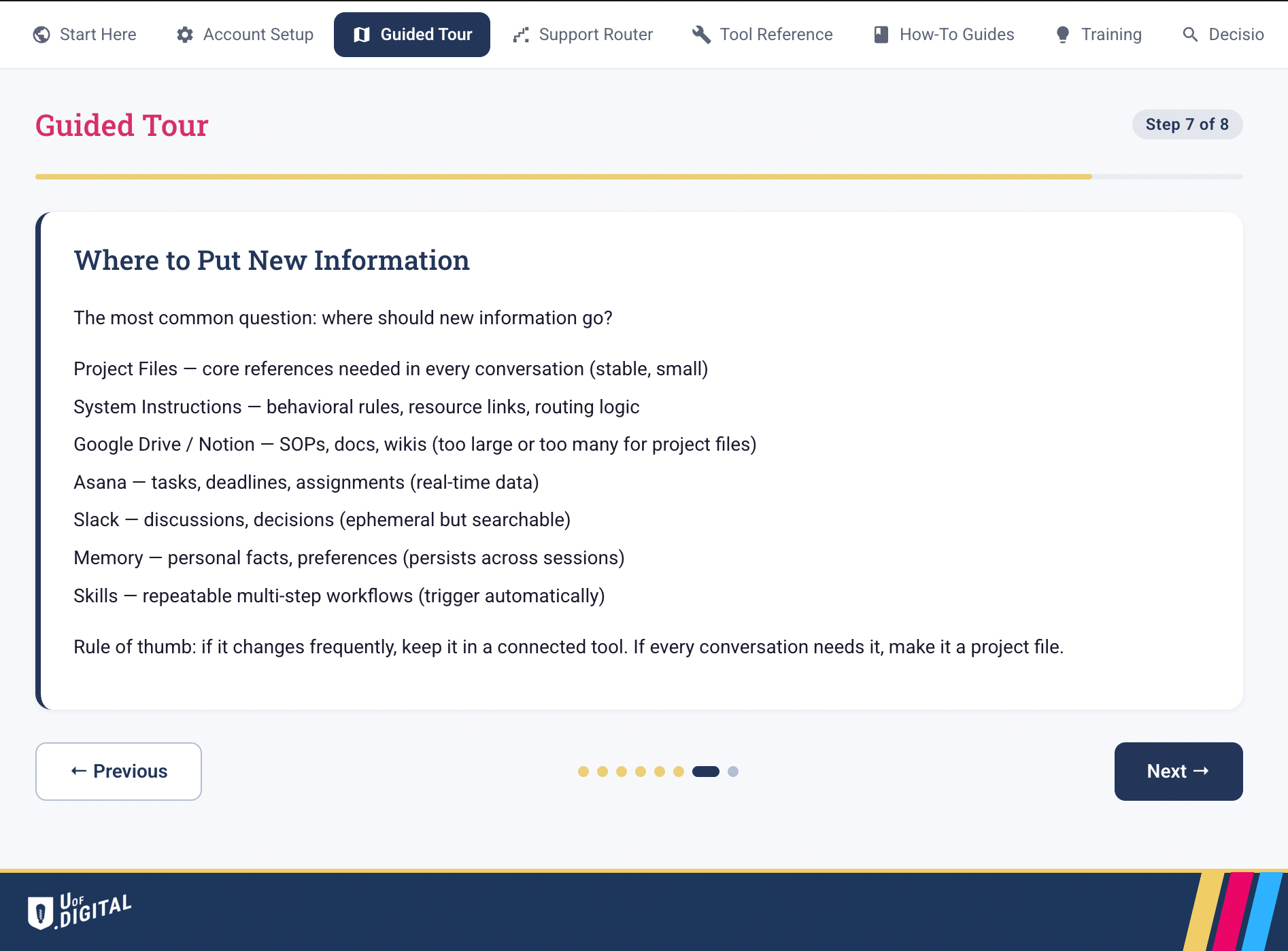
I settled on a top down checklist to ask in order anytime we need to add new knowledge. This is the whole system in miniature.
Files for what is always needed and rarely changes. Live tools for what changes constantly. Memory for who you are. Skills for what you do repeatedly. Signposts for everything else.
What this means for you and your team
For us, the payoff is not simply doing more with a smaller team. It is shortening the distance between something changing in the industry and our learners understanding what to do with it.
That takes more than an assistant that can summarize documents. It has to find the right knowledge, apply the right context, and still leave people responsible for the final call.
You do not need a bigger model or a special integration to get most of this.
You need to decide, deliberately, what your assistant should always know, what it should look up, what it should remember, and what it should be able to do without being walked through it.
Write those four answers down. That is the build.
The hardest part is still ahead: getting adoption from your team. This is also where Claude comes in handy.
Try it yourself
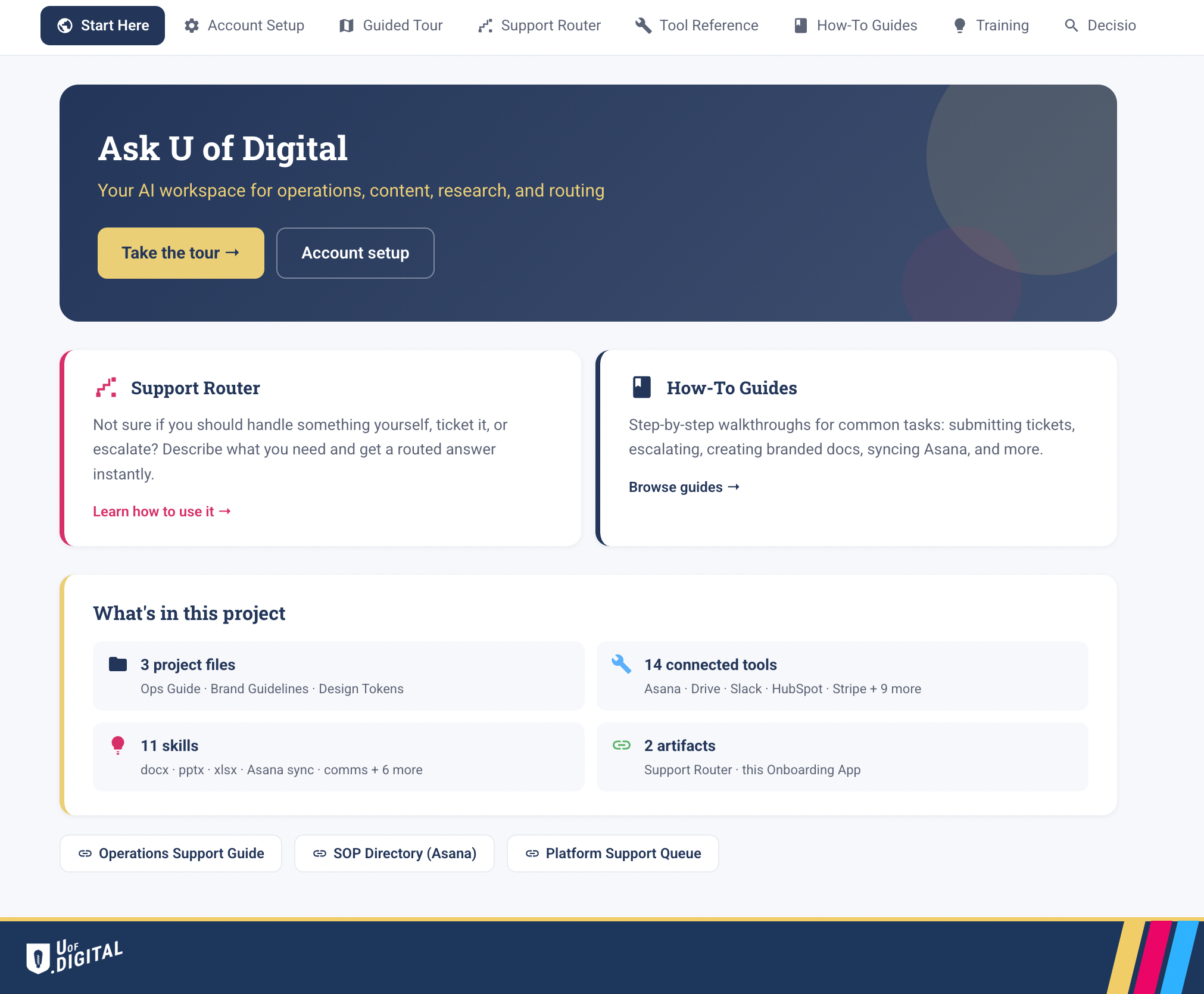
Build artifacts your team can actually use for training, not just documentation they have to read. You can set this up for your own team in about 3 hours.
If you grabbed the Support Ops Cleanup Skill from our last post, this is the next step: you have clean SOPs, now build the workspace that uses them.
Here is the path we took.
- Get on a Claude Team plan. Ask Your Org requires a team account.
- Enable Ask Your Org. Go to claude.ai/ask-your-org and create your organization’s workspace.
- Connect your tools. Link the systems your team actually works in: task manager, docs, chat, calendar.
- Organize your context using the knowledge checklist. For each piece of knowledge your team needs, ask: does every conversation need it (project file), does it change often (connected tool), is it a stable fact (memory), is it a repeatable process (skill), or is it too large to attach (signpost)?
- Build an onboarding artifact. Use the prompt below to have Claude create a training dashboard for your team, so new members land in a workspace that already knows how you work.
The short guide is open. Download the Claude Ask Your Org Custom Assistant guide (PDF). It walks through the five layers, the knowledge checklist, and the build sequence.
The complete builder kit goes further. It includes the prompts, AGENTS.md, CLAUDE.md, reusable skills, templates, and the full project archive.
In the coming months, I’ll be publishing more of these guidebooks and how-tos on how U of Digital is using AI to deliver training more effectively and efficiently.
If you want to get notified, we’ll be featuring these posts in our weekly newsletter.
Kyle Brodeur is Director of Tech at U of Digital, which has been helping global marketing and advertising companies get smarter and grow since 2018. Connect with me on LinkedIn, or send me an email if you have feedback, questions, or ideas.